
Retrieval-Augmented Generation (RAG) architecture is transforming how modern AI applications deliver accurate and context-aware responses. Instead of relying solely on pre-trained knowledge, RAG combines semantic search with Large Language Models (LLMs) to retrieve relevant information from external data sources before generating answers. This approach significantly improves accuracy, reduces hallucinations, and enables AI systems to work effectively with real-time and private data.
This is where Retrieval-Augmented Generation (RAG) comes into play.
RAG combines information retrieval with language generation, enabling AI systems to deliver more reliable and context-aware responses.
What is RAG?
Retrieval-Augmented Generation (RAG) is an architecture that enhances LLM responses by:
- Retrieving relevant information from external data sources
- Feeding that information into the model
- Generating responses based on both retrieved data and model knowledge
Instead of relying only on pre-trained knowledge, RAG allows AI to “look things up before answering.”
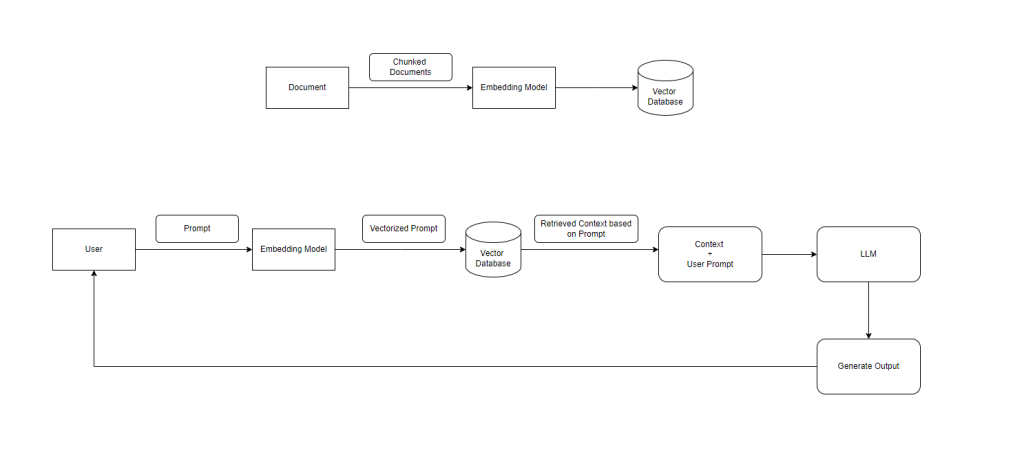
RAG Architecture Overview
The architecture consists of two major pipelines:
- Data Ingestion Pipeline (Indexing)
- Query Processing Pipeline (Retrieval + Generation)
Data Ingestion Pipeline
This phase prepares your data so it can be efficiently searched later.
Step 1: Document Collection
Raw data is gathered from multiple sources:
- PDFs
- Databases
- APIs
- Knowledge bases
Step 2: Document Chunking
Large documents are broken into smaller chunks.
Why?
- Improves search precision
- Ensures relevant context is retrieved
Step 3: Embedding Generation
Each chunk is converted into a vector using an embedding model.
- Text → Numerical representation
- Captures semantic meaning
Step 4: Vector Storage
Embeddings are stored in a vector database such as:
- Pinecone
- Weaviate
- FAISS
This enables fast similarity-based search.
Query Processing Pipeline
This phase handles user queries in real time.
Step 1: User Query
The user submits a prompt or question.
Step 2: Query Embedding
The query is converted into a vector using the same embedding model.
Step 3: Semantic Search
The vector database is queried to find:
- Most relevant document chunks
- Based on similarity
Step 4: Context Retrieval
Top matching results are retrieved as context.
Step 5: Context + Prompt Combination
The system combines:
- User query
- Retrieved context
Step 6: LLM Response Generation
The combined input is sent to the LLM.
The model generates a response that is:
- Context-aware
- Accurate
- Grounded in real data
Step 7: Output to User
The final answer is returned to the user.
End-to-End Flow Summary
- Documents are processed and stored as vectors
- User query is converted into a vector
- Relevant data is retrieved from the vector database
- Retrieved data is sent to the LLM
- LLM generates a response using both context and knowledge
Read Article- https://tutexchange.com/open-source-iam-tools-self-hosted-sso/