
Learn how to effectively use Session in ASP.NET Core 3.0 to manage user data across requests. This guide walks you through the entire process — from setting up session services in Startup.cs to configuring middleware and storing data like strings, integers, and complex objects.
Discover best practices for handling session timeouts, clearing data, and ensuring performance and security. Whether you’re building a small app or a large-scale web solution, this blog provides a clear, step-by-step approach to mastering session management in ASP.NET Core 3.0. Perfect for developers looking to maintain stateful data in a stateless web environment!
As we all know all web application work on HTTP protocol and this protocol is stateless to maintain state, we need to use State Management techniques.
Below are 2 types of State Management techniques of server-side and client-side.
Server-side
- Session state
- TempData, ViewBag, View Data
- Cache
Let’s start with Understanding Server-side Methods
Session
A session is a key component in the web application which helps to maintain state and session are stored on the server.
We have been using session from long-time from ASP to ASP.NET MVC now we have Session in ASP.NET Core too but syntax and way to use keep changing but the core mechanics remain same.
For showing demo, I am going to start with creating an ASP.NET Core Web Application with Name “WebApplication2“.
Creating New Project
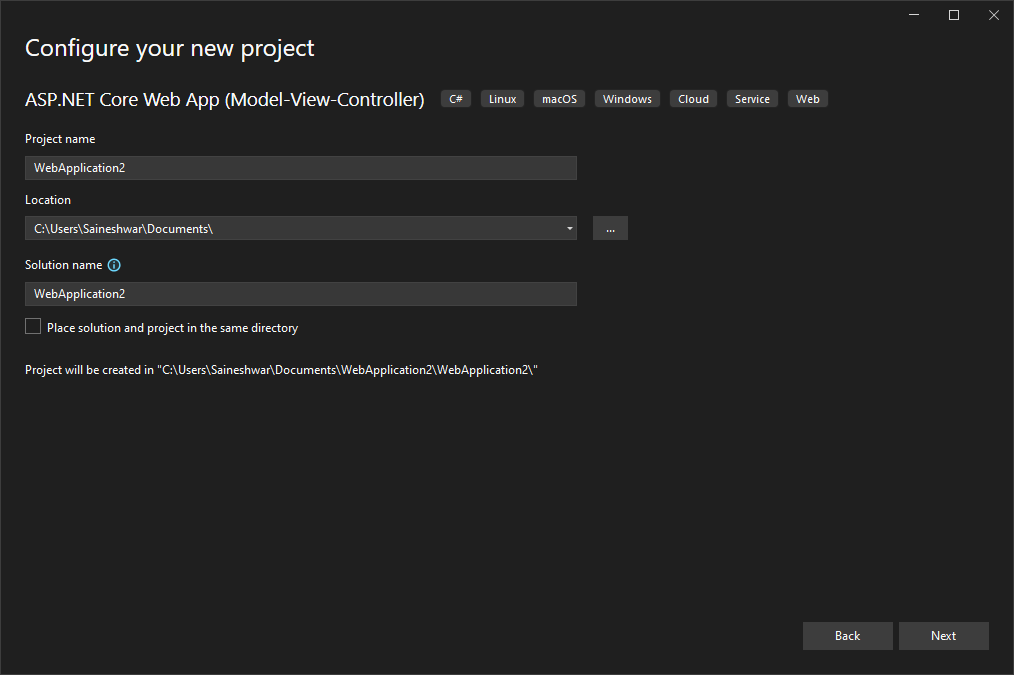
Once you have created a project you will see the entire project structure in Solution Explorer.

Now you have created project let’s learn how to configure application such that we can use Session in it.
For using Session in ASP.NET core we need to add service of the session to ConfigureServices Method which is located in Startup.cs class.
Added Session Service in Configure Services
public void ConfigureServices(IServiceCollection services)
 {
     services.AddSession(options =>
     {
         options.IdleTimeout = TimeSpan.FromMinutes(30);
         options.Cookie.HttpOnly = true;
         options.Cookie.IsEssential = true;
     });
     services.AddControllersWithViews();
 }

For adding service, we have used services.AddSession method and in that we have configured a few options.
Idletimeout option: – how long session will be ideal before it expires and the only session will expire in this not cookie if you are using a cookie.
HttpOnly: – if we set cookie HTTP Only attribute to true then we cannot access cookie through a client-side script. For securing application it should always be set to true.
IsEssential: – Is this cookie essential for your application if yes then set IsEssential to true else false.
Adding Session Middleware
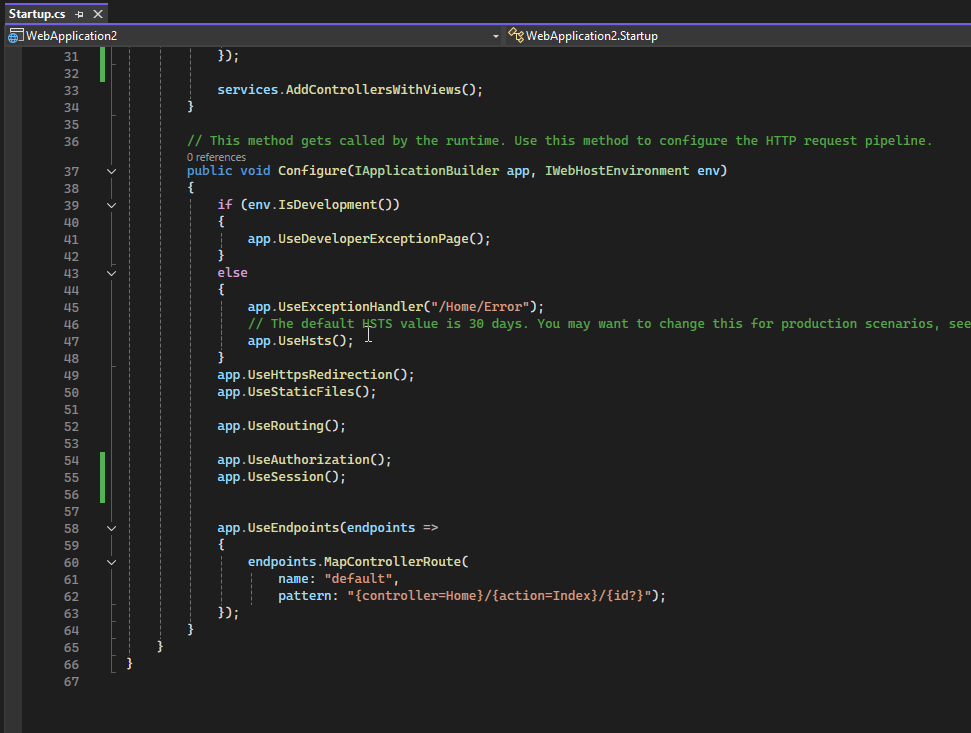
Now we are going to configure Session Middleware in Startup.Configure Method just by adding app.UseSession(); before app.UseMvc Middleware.
public void Configure(IApplicationBuilder app, IWebHostEnvironment env)
{
    if (env.IsDevelopment())
    {
        app.UseDeveloperExceptionPage();
    }
    else
    {
        app.UseExceptionHandler("/Home/Error");
        app.UseHsts();
    }
    app.UseHttpsRedirection();
    app.UseStaticFiles();

    app.UseRouting();

    app.UseAuthorization();
    app.UseSession();
    app.UseEndpoints(endpoints =>
    {
        endpoints.MapControllerRoute(
            name: "default",
            pattern: "{controller=Home}/{action=Index}/{id?}");
    });
}
Now we have configured session in this application let’s create session, store some values in session and retrieve values from it.
Creating Session
We are going to create a session for doing that. we are going to use Home Controller, which has the Index Action method.
For creating a Session, we need to import namespace Microsoft.AspNetCore.Http after importing
We are going set Session for setting session we have 2 SessionExtensions one for setting string value and another for setting integer value.
First, let’s use SetString SessionExtensions for storing the value in the session.
Setting Session (storing)
Key: – “DemoSession”
Value: – “Hi Session”
HttpContext.Session.SetString(“DemoSession”, “Hi Session”);

Source Code
using Microsoft.AspNetCore.Mvc;
using Microsoft.AspNetCore.Http;

namespace WebApplication2.Controllers
{
    public class HomeController : Controller
    {
        public IActionResult Index()
        {
            HttpContext.Session.SetString("DemoSession", "Hi Session");
            return View();
        }

        public IActionResult Privacy()
        {
            return View();
        }
    }
}
Reading Stored Session Value
For retrieving value which is stored in session we are going to use GetString SessionExtensions.
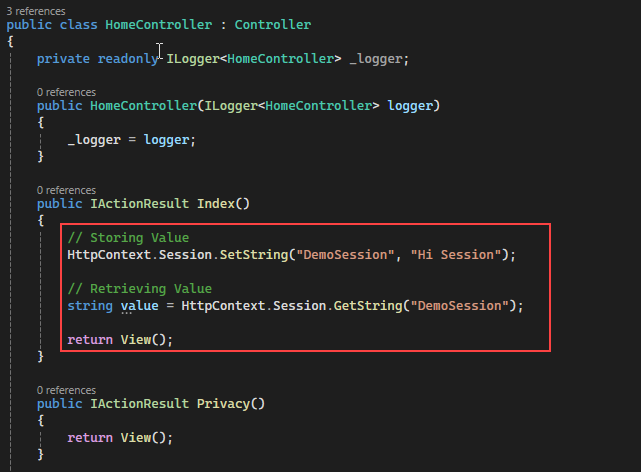
Key: – “DemoSession”
string value = HttpContext.Session.GetString(“DemoSession”);
Source Code
using Microsoft.AspNetCore.Mvc;
using Microsoft.AspNetCore.Http;

namespace WebApplication2.Controllers
{
    public class HomeController : Controller
    {
        public IActionResult Index()
        {
            // Storing Value
            HttpContext.Session.SetString("DemoSession", "Hi Session");

            // Retrieving Value
            string value = HttpContext.Session.GetString("DemoSession");

            return View();
        }

        public IActionResult Privacy()
        {
            return View();
        }
    }
}
Similar way we can store integer values and retrieve it using GetInt32 SessionExtensions.
// Storing Value
 HttpContext.Session.SetInt32("DemoSessionInteger", 99);
// Retrieving Value
 int? integervalue = HttpContext.Session.GetInt32("DemoSessionInteger");
Now Let’s Run the project and see values in debug mode.

Conclusion
Session management is a powerful way to maintain user-specific data across multiple requests in ASP.NET Core 3.0 — especially in scenarios where cookies or query strings aren’t enough. By setting up session services, configuring middleware, and securely storing data, you can handle everything from user preferences to temporary shopping cart details with ease.
However, it’s important to remember that session data is temporary and should not replace a persistent data store like a database. For performance and reliability, always manage session lifetimes carefully, clean up unused data, and avoid storing large objects or sensitive information.
With the right approach, ASP.NET Core 3.0 sessions can improve user experience, streamline data handling, and simplify state management in your web applications. Now that you’ve mastered the basics
Learn What is Temp Data :- https://tutexchange.com/using-tempdata-in-asp-net-core-3-0/
Reference:- https://learn.microsoft.com/en-us/aspnet/core/fundamentals/app-state?view=aspnetcore-9.0