
When a producer creates a message, it is first sent to an exchange, not directly to a queue. The exchange acts as a router, directing the message to the appropriate queue based on header attributes, bindings, and routing keys.
There are four types of exchanges, each routing messages differently. You can also configure various parameters for the exchange, such as type, durability, auto-delete, and whether it is internal.
Different types of Exchanges
- Direct Exchange
- Fanout Exchange
- Topic Exchange
- Header Exchange
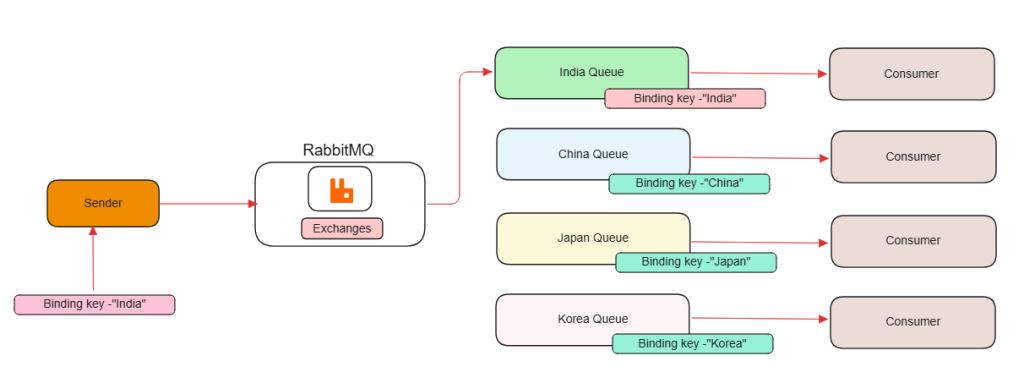
Direct Exchange
Direct: A direct exchange sends messages to queues where the binding key matches the message’s routing key exactly.
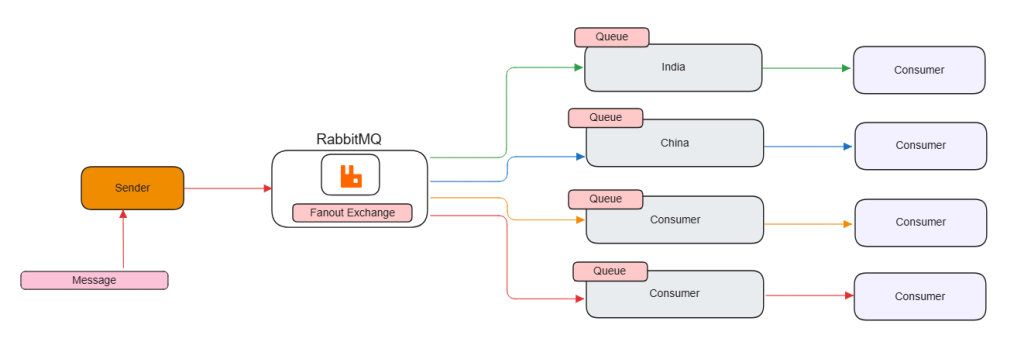
Fanout Exchange
Fanout: A fanout exchange sends messages to all queues connected to it.
Topic Exchange
The topic exchange does a wildcard match between the routing key and the routing pattern specified in the binding.
This allows for flexible message routing using wildcards:
*matches exactly one word.#matches zero or more words.
Example: Queues and Binding Patterns:
- Queue 1:
- Binding Pattern:
mumbai.* - Matches:
mumbai.weather,mumbai.traffic. - Does not match:
pune.weather,bangalore.traffic.
- Binding Pattern:
- Queue 2:
- Binding Pattern:
*.traffic - Matches:
mumbai.traffic,pune.traffic,bangalore.traffic. - Does not match:
mumbai.weather,chennai.events.
- Binding Pattern:
- Queue 3:
- Binding Pattern:
bangalore.# - Matches:
bangalore.weather,bangalore.events.festivals,bangalore.traffic.alerts. - Does not match:
pune.weather,mumbai.traffic.
- Binding Pattern:
- Queue 4:
- Binding Pattern:
#(Catch-all pattern) - Matches: All routing keys, such as
mumbai.weather,chennai.traffic,bangalore.events,pune.sports.
- Binding Pattern:

Header Exchange
Headers: Headers exchanges use the message header attributes for routing.
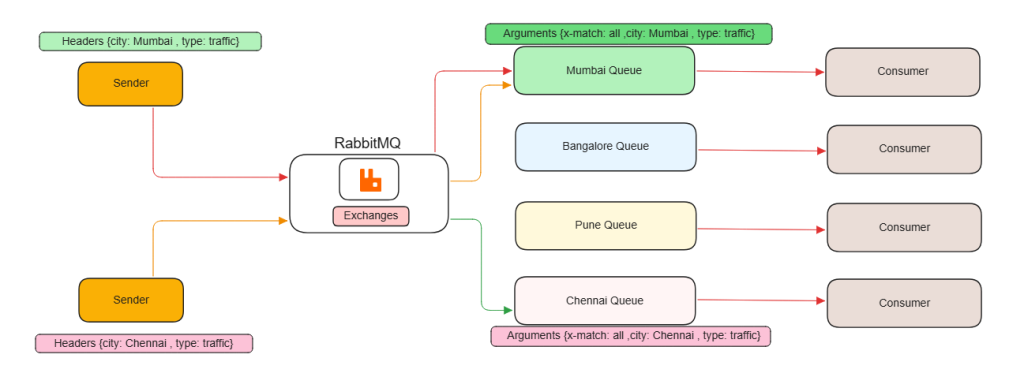
x-match: all
- This means all the specified header values must match the binding headers in order for the message to be routed to the queue.
- If any header in the message does not match the binding, the message will not be routed to the queue.
- Use case: This is useful when you need multiple specific criteria to match before routing the message.
Example:
- Binding:
{ x-match: "all", city: "Mumbai", type: "traffic" } - Message Header:
{ city: "Mumbai", type: "traffic", severity: "high" } - Result: The message matches because both
cityandtypeheaders are the same as the binding headers.
x-match: any
- This means any of the specified header values must match the binding headers for the message to be routed to the queue.
- If at least one header in the message matches a header in the binding, the message will be routed to the queue.
- Use case: This is useful when any matching condition should trigger routing.
Example:
- Binding:
{ x-match: "any", city: "Mumbai", type: "traffic" } - Message Header:
{ city: "Mumbai", severity: "high" } - Result: The message matches because the
cityheader matches the binding.