

In this article, we are going to learn how to consume the ASP.NET Core WEB API GET by Id Method in simple steps.
In our previous article, Consuming ASP.NET Core API GET Method in .Net Core Console Application, we saw how to call an API that returns a collection of data.
Now, we’ll focus on a different type of GET method — GET by Id. This method allows us to pass an ID in the URL, and in return, we get a single record that matches that ID.
We already have a GET by Id API which is developed in ASP.Net Core we are going to consume this API in the .Net Core Console Application.
API which we are going to call


Let’s first call GET by ID API using Postman
URI: – https://localhost:44373/api/Music/1
If you see about URI, we have passed the ID of Song which will return a single song as shown in response.


Creating Console Application
For Consuming APIs, we have created a .Net Core Application which Target Framework .Net 6.0 with the name Console consumer


Steps to consume WEB API GET by ID we need.
- HttpClient class instance for sending HTTP Requests.
- Setting Base Address “https://localhost:44373”
- Setting Accept Header “application/json”
- Adding a class with the name SongModel which has properties and fields of response json.
- Next, we are calling GetAsync Method and Passing Request Uri (“/api/Music/1”) to it which will send a GET request to the specified Uri in an asynchronous way.
- Added Newtonsoft.Json Nuget package
- DeserializeObject (response we are going to receive will be Json format which we need to map to .Net Type)
Method for Consuming API
In this method, we are going to set BaseAddress https://localhost:44373 along with Accept Headers as application/json and call GetAsync (“GET Method”) to the GetAsync() method we are going to pass the request, Uri “/api/Music/{songid}”.
As this method GetAsync() will get called we are going to receive a response and in this response, the first thing we are going to do is check the Status of it if it is a success then we are going to read the response and then Deserialize it.
As in the GET method, we use it to get a collection of data in response here in the Get by ID method we are going to get only a Single object in response.
Code Snippet
 static async Task GetByIdData()
        {
            using var client = new HttpClient();
            client.BaseAddress = new Uri("https://localhost:44373");
            client.DefaultRequestHeaders.Accept.Clear();
            client.DefaultRequestHeaders.Accept.Add(new MediaTypeWithQualityHeaderValue("application/json"));
            int songid = 1;
            HttpResponseMessage response = await client.GetAsync($"/api/Music/{songid}");
            if (response.IsSuccessStatusCode)
            {
                var responseBody = await response.Content.ReadAsStringAsync();
                try
                {
                    var song = JsonConvert.DeserializeObject<SongsModel>(responseBody);
                    if (song != null)
                    {
                        Console.WriteLine($"Name: {song.Name},Year: {song.Yearreleased}");
                    }

                    Console.ReadLine();
                }
                catch (JsonReaderException)
                {
                    Console.WriteLine("Invalid JSON.");
                }

            }
        }
Calling GetByIdData Method in Main() Method
 static void Main(string[] args)
 {
     GetByIdData().Wait();
 }
View of runtime receiving a response

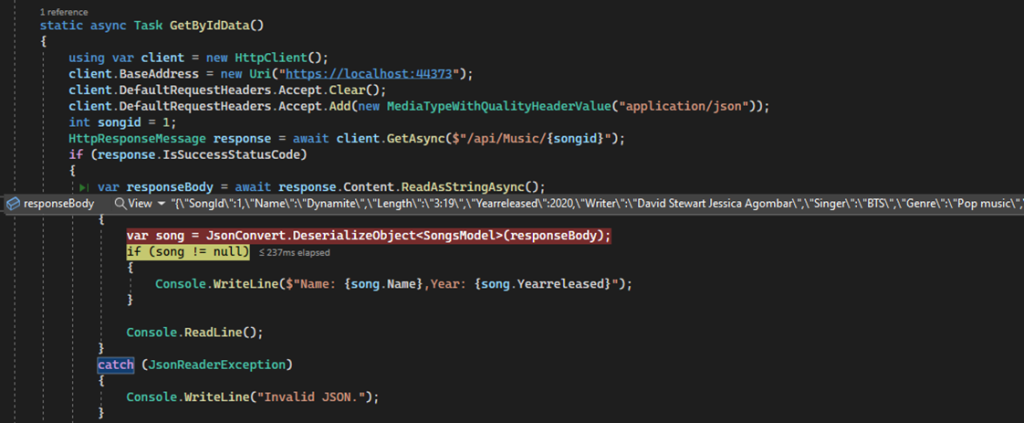
Json object which we have received in response

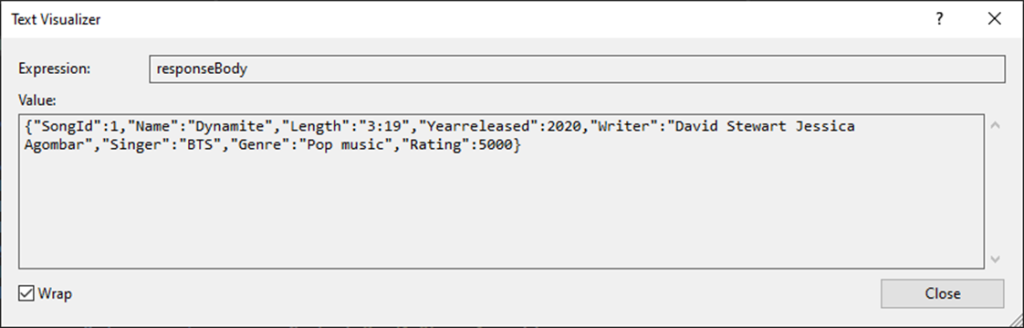
Below snapshot after the deserializing Json object


In this article, we have learned how to consume the GET Method with a parameter named id in the .Net Core Console Application in simple steps with sample code.
Conclusion
In this article, we learned how to consume a Web API GET method with a parameter in a .NET Core Console Application. By passing an id in the URL, we were able to retrieve a specific record from the API.
Using HttpClient, we built a simple and effective way to make requests, handle responses, and work with strongly typed data. This is a key concept when working with RESTful APIs and will help you as you build more advanced applications that communicate with external services.
Now that you understand how to fetch data by ID, you can move forward and explore other HTTP methods like POST, PUT, and DELETE to perform full CRUD operations.
Welcome to my New Dotnet Shorts #DOTNETSHORTS Series I Hope you like it small simple and focused.